
Most small cafés still keep food safety records on paper: a Safer Food, Better Business (SFBB) pack, a clipboard of fridge temperatures and a diary that someone signs at the end of the day. Paper works when everyone fills it in on time. The trouble is what happens when they don't. A missed fridge check is invisible until the inspector turns the page, a warm fridge is only noticed when someone happens to look, and a week of entries written up on a Sunday night is easy to spot.
Digital food safety records fix those gaps. This guide explains what you need to record, what a digital system does differently, and how Café QR's Food safety section handles each part, with screenshots from the app.
What you need to record
In the UK every food business needs a food safety management system based on HACCP principles. For most cafés that means the SFBB pack or something that does the same job. In practice your records come down to:
- Opening and closing checks: hand basins stocked, surfaces clean, no signs of pests.
- Temperatures: fridges and freezers, hot holding, and the core temperature of food you cook, cool and reheat. In England, Wales and Northern Ireland chilled food must be kept at 8°C or below, and hot food held at 63°C or above.
- Deliveries and probe checks: what came in and at what temperature, and that your probe still reads correctly.
- What you did when something went wrong: the corrective action. An out-of-range reading with no fix written next to it is one of the first things an inspector looks for.
- A daily sign-off: a manager confirming the day's checks were done.
- Staff training, pest control, maintenance and complaints.
- Allergen information, including full labels for food you prepack for direct sale (Natasha's Law).
None of this is new. What changes with a digital system is when the record is made, who sees a problem, and how fast you can show it to an inspector.
Start every shift from one screen
Café QR's Food safety section opens on Today. It lists anything that can't wait, every check time you have set up in order, and the last reading from each fridge, freezer and hot hold. Staff don't need to know where each record lives: they press Log something or the button next to the task.
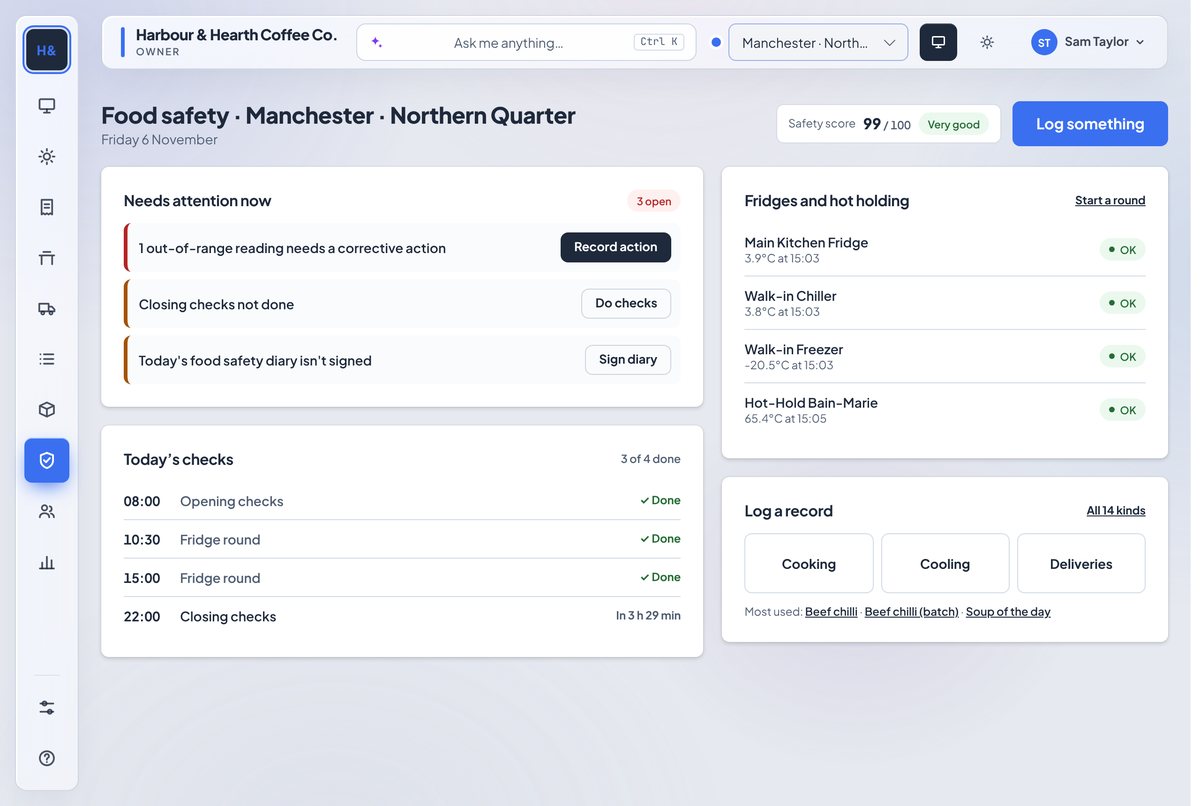
If you set check times, such as opening checks at 08:00 and fridge rounds at 10:30 and 15:00, each one shows Done, Due now or Overdue. That is the difference between knowing a check was missed today and finding out at the next inspection.
Temperature rounds nobody can tap through
A temperature round goes through each fridge, freezer and hot hold in turn, on the till or on a member of staff's own phone. The keypad starts empty, so nobody can press through without probing. The reading turns green when it is in the safe range for that equipment.
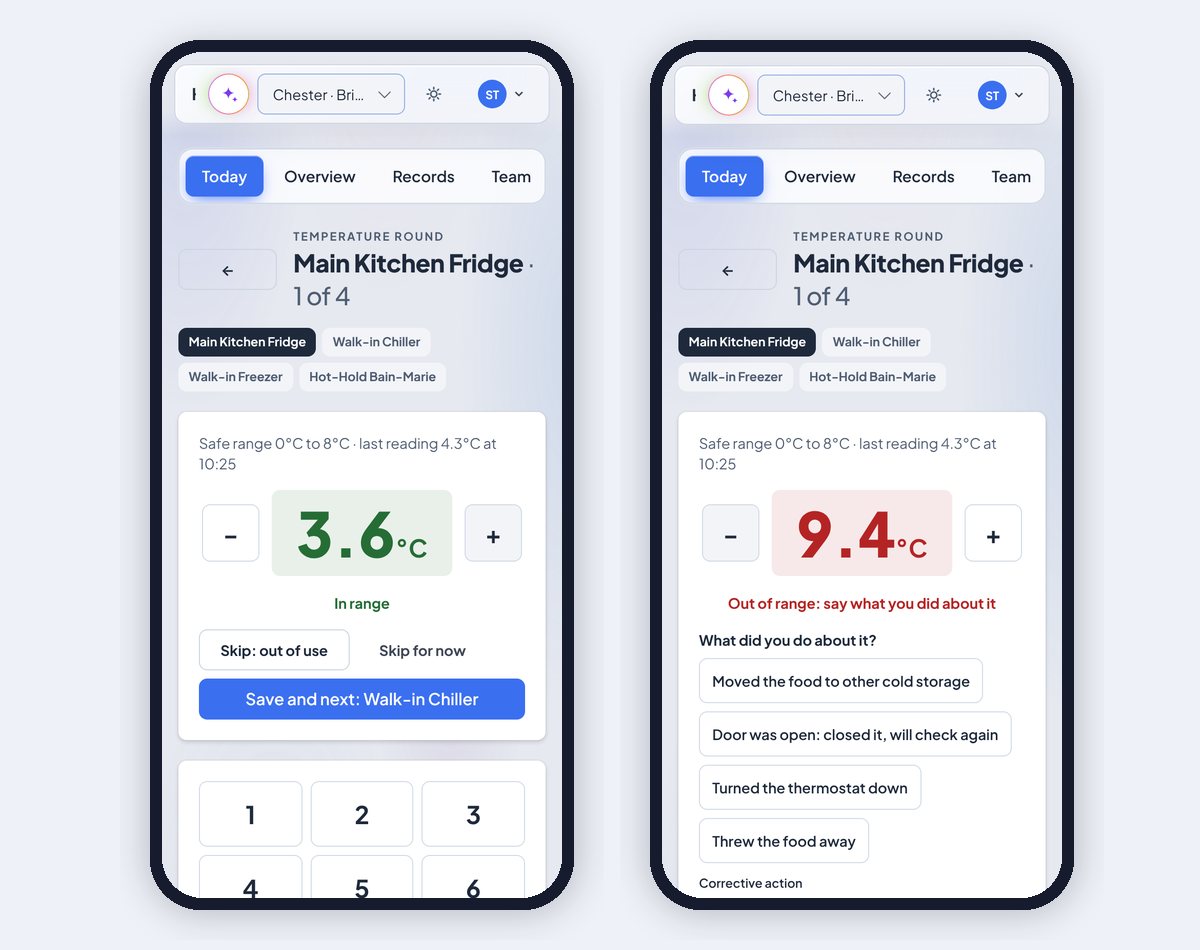
When a reading is out of range, the round asks what you did about it: moved the food, closed the door and checked again, turned the thermostat down or threw the food away. You can tick Remind me to check again in 30 minutes. If it can't be fixed there and then, Can't fix now, tell the manager saves the reading and alerts the manager.
Alerts when something can't wait
An out-of-range reading with no fix, or a missed opening check, closing check or fridge round, sends the people you choose a text and an email. The problem stays on Today until someone records what was done, so it can't be quietly forgotten. You choose who gets alerts for each site in Set up. See alerts, check times and the till for the details.
A safety score that shows where you lose points
Every site gets a score out of 100 from its own records over the last 30 days. It is made of five parts: checks done on time, breaches handled, days signed off, follow-ups closed and training kept current. Under the score you see Where points were lost, each linked to the record, and Quickest wins, the changes that would raise the score most.
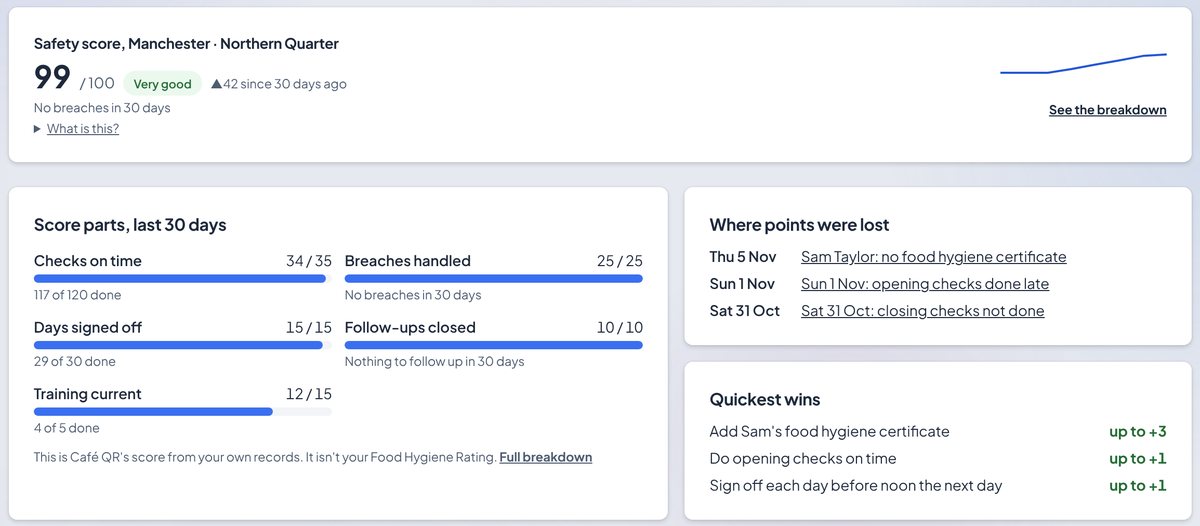
The score is not your Food Hygiene Rating, and it doesn't predict one. It shows how well your records are kept, which is one of the three things an inspector scores. Our guide to getting a 5 star food hygiene rating covers the other two.
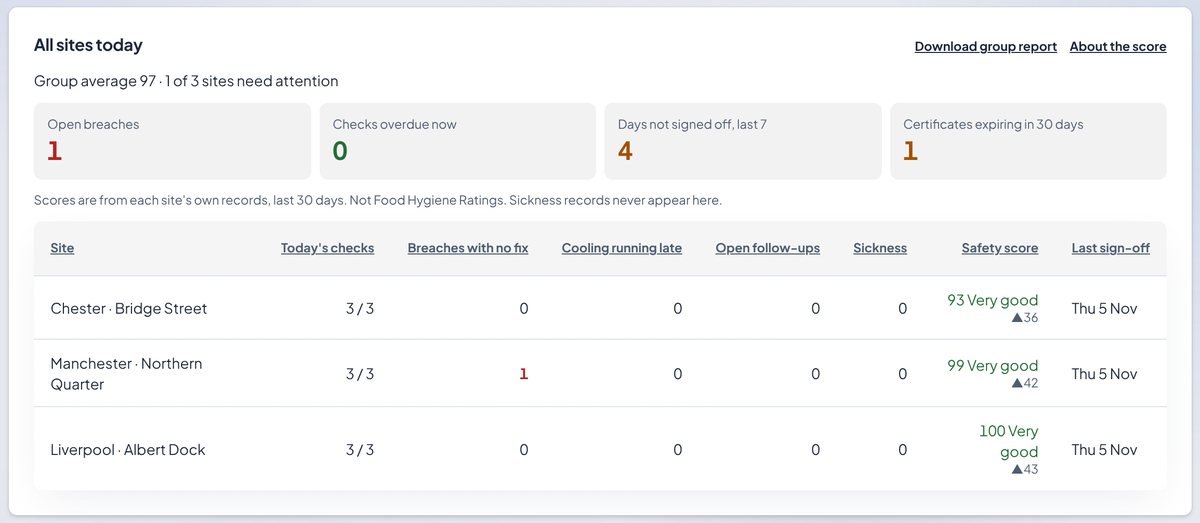
If you run more than one site, pick All locations to see every site side by side, lowest score first, with open breaches, overdue checks, days not signed off and certificates expiring in the next 30 days at the top. Owners with two or more sites also get a weekly safety email.
Natasha's Law labels built from your recipes
Food that is prepacked for direct sale, such as a sandwich wrapped in the morning and sold from the chiller, needs a label with its name and a full ingredients list with the 14 allergens emphasised. Writing those by hand is slow and easy to get wrong when a supplier changes a product.
In Café QR you mark a dish as prepacked and it builds the ingredients list from the recipe, heaviest first, with allergens in bold. A manager checks it against the supplier labels and ticks to confirm it before it can print. If anyone changes a weight in the recipe, the label needs confirming again.
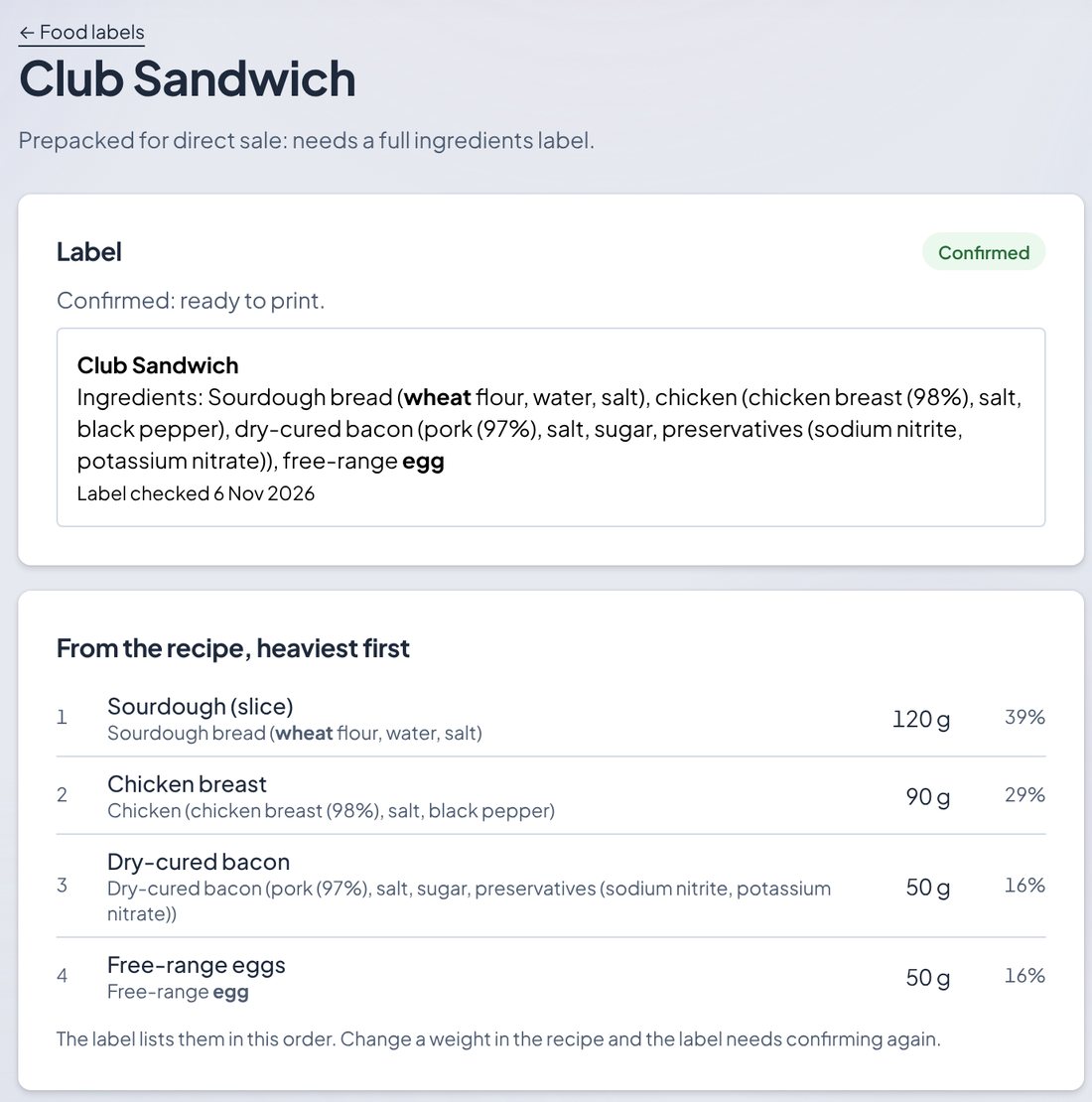
Your business is still legally responsible for its labels. Café QR builds the draft from what you entered; the check against the supplier labels is yours.
Your team, their phones and their training
Staff can add Café QR Staff to their own phone to get reminders on shift and log records without going to the till. Each record still needs the person's PIN, so you know who logged what. The Team tab shows food hygiene certificates with their expiry dates and, for managers, who has logged what at each site in the last 30 days.
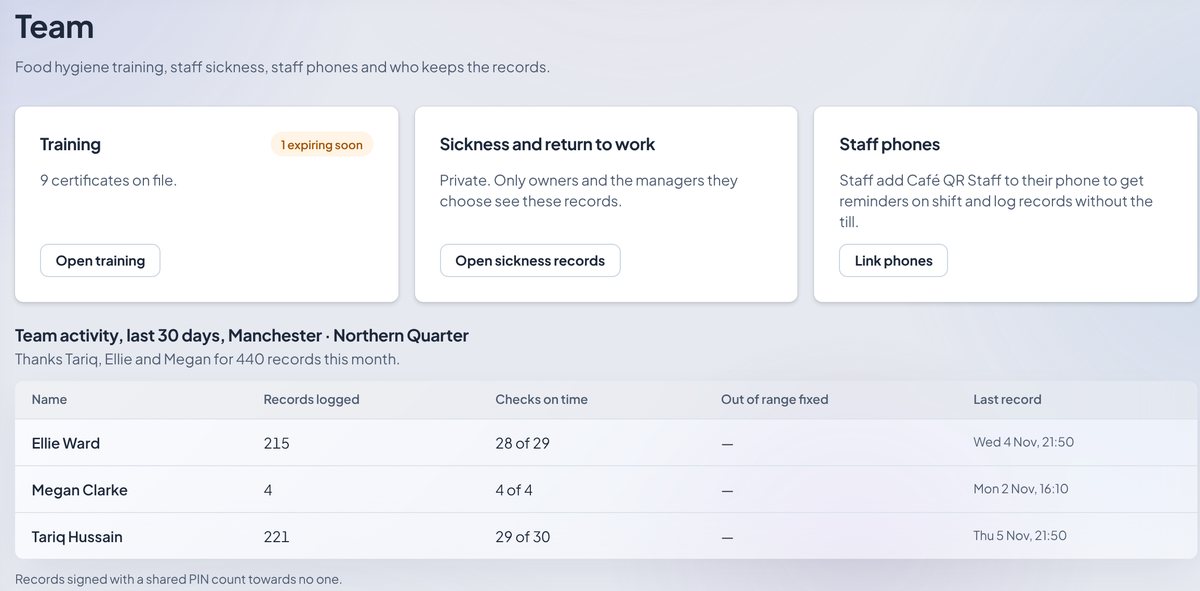
Sickness and return-to-work records are private: only owners and the managers they choose can see them, and they never appear in group views. Records also save when the Wi-Fi drops and send when it comes back, so a weak signal in the walk-in doesn't mean a missing reading.
Ready for the inspector
Inspection builds one report from everything above: diary sign-offs, temperatures and the fixes recorded, cooking, cooling, delivery and probe records, pest control, maintenance, complaints, training and the 14 allergens matrix for your menu. Pick 7 days, 30 days, 90 days or 12 months and save it as a PDF.
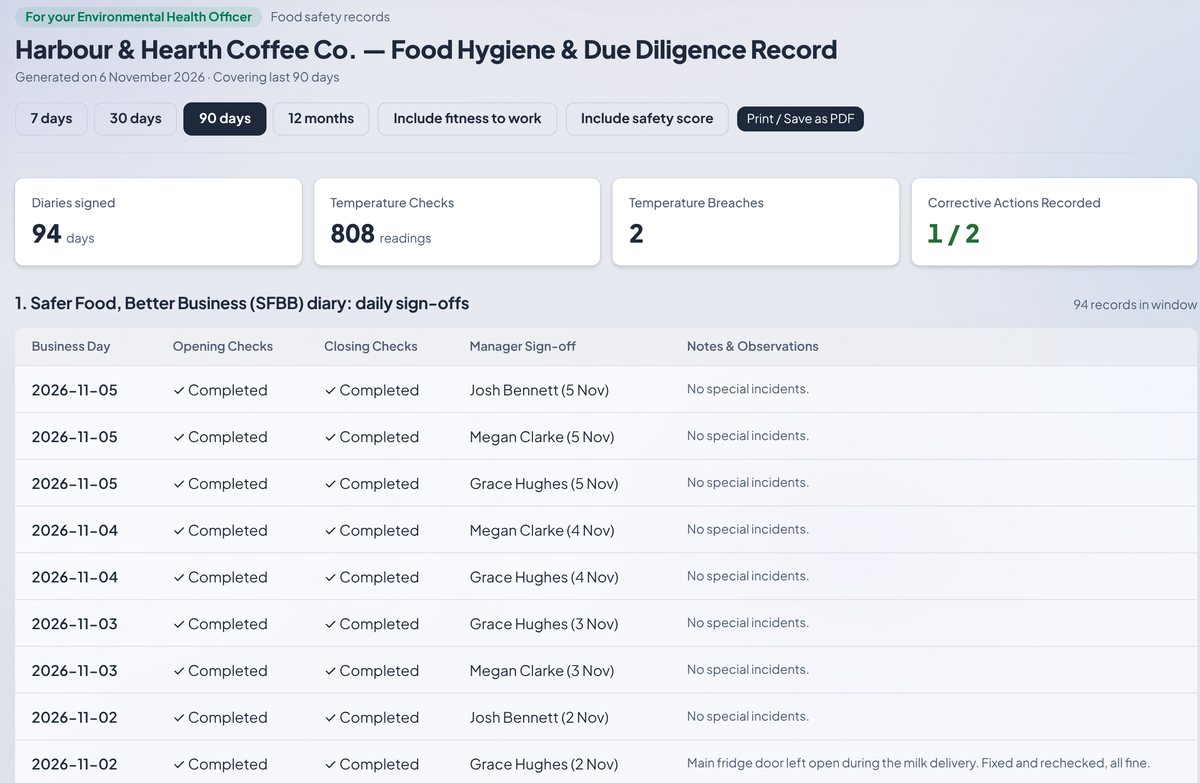
Past days can't be changed. If something was missed, you write what happened in today's notes. That is what makes the record worth trusting.
Paper or digital: what changes
| Paper SFBB diary | Café QR Food safety | |
|---|---|---|
| Missed check | Found at the next inspection | Shows as overdue, and the manager is alerted |
| Warm fridge | Noticed if someone looks | Out-of-range reading asks for a fix, and alerts if there isn't one |
| Who logged it | A signature, if there is one | The person's PIN on every record |
| Natasha's Law labels | Typed by hand | Built from the recipe and confirmed by a manager |
| Inspection | A folder to look through | One report, saved as a PDF |
Setting it up
Open Safety in your dashboard and go to Set up. Add your fridges, freezers and hot holds with their safe ranges, write your opening and closing checklists, set check times, and choose who gets alerts. Set up shows how far you have got, and you can start recording before it is finished. The Food safety help guide walks through each tab.
What it costs
Food safety is included in the POS plan, from £39 a month, and in Multi-site. You can add it to any other plan for £6 a month. Every plan starts with a free first month, with no card and no contract. See how Food safety works or start your free month.
Screenshots in this post use a sample café and sample data.