
Features
A full POS for cafés, restaurants and bars.
No card No contract Help on WhatsApp Cancel any time
or try the live demo →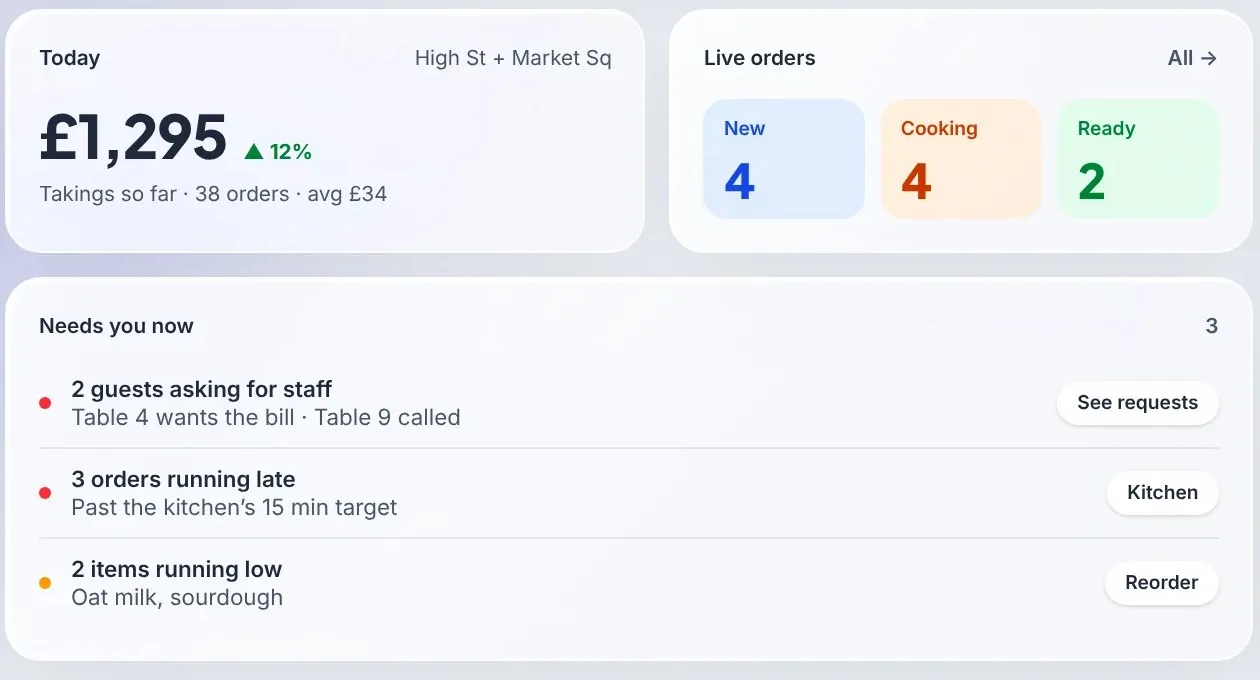
Point of sale (POS plan)
A counter till for the tablet, phone or laptop you already have, with cash, card readers, tabs, refunds and cash-up. It is part of the POS plan, £39 a month, or £15 a month as an add-on.
Ring up counter sales →
Tap items from your own menu, choose options, add a table, name or note, and send the order to the kitchen screen and printer.
Cash with change due
Quick cash amounts and the change to hand back. Tax is worked out at the cash rate where your country has one.
Card reader (UK) →
Send the total to a Stripe Terminal smart reader, paid into your own Stripe account. Or take card on your own machine and record it.
Open tabs and unpaid orders
Pay later leaves a tab. Cash and Card buttons on the kitchen screen settle any unpaid order.
Phone and delivery orders →
Take a phone order as eat in, takeaway or delivery. The customer's saved address comes up from their number, the zone fee is added, and you choose a rider.
Voids with a manager's PIN →
Void an item after it has gone to the kitchen, always with a reason. Waiters need a manager's PIN, the kitchen sees the line struck through, and Leakage reports every void.
Cash-up export →
Takings split into online, cash at the till, card at the till and still to take, with tips, service charge and VAT.
Works on touch screens
Large tap targets, a bottom sale bar on phones and a home-screen icon that opens it full screen.
Running the floor (POS plan)
For table-service cafés, restaurants and bars. Part of the POS plan, £39 a month.
Waiter app →
The till on a phone: take an order at the table and send it to the kitchen, without walking back to the counter.
Tabs and moving tables →
Unpaid orders build up on the table's tab until it pays. Move a tab when a party changes tables, and guests can see and split the bill from the table's code.
Floor plan →
Arrange your tables like the room. Each one shows whether it is free, ordering or waiting to pay, and what it has spent.
Table bookings →
A booking page for your website that only offers times you have seats for. Guests get an add-to-calendar file and can cancel themselves; staff add phone bookings, seat guests and mark no-shows.
Kitchen screens by station →
Send drinks to the bar and food to the kitchen: each station shows and marks ready only its own dishes, and late orders turn amber, then red.
Courses and seats →
Put each line in a course and on a seat in the waiter app. The kitchen gets course 1, and course 2 is held until the waiter sends it.
Gift cards →
Sell gift cards at the counter, print each with its own code, and take them at the till, on the QR menu, at the kiosk or online. Kept out of sales until spent.
Happy hours and meal deals
Automatic promotions by day and time: a percentage or amount off, buy one get one, or a meal deal at a set price that never costs more than the items separately, for table, till or online orders.
Customer display
A second screen facing the customer shows their order and total as you ring it up on the till.
Delivery riders →
Assign delivery orders to your own riders. Each rider gets a link on their phone with the address, a map, a call button and what to collect.
Delivery app orders →
Delivery app orders land on your kitchen screen and printers next to your own, through Deliverect, Otter or the order API. Direct Uber Eats and Deliveroo connections are coming soon.
Rota, time clock and cash-up →
Plan the rota against sales, clock staff in and out, and share tips by hours. Open the drawer with a float and close it against what should be there.
Staff, kitchen and bar
Paid orders go straight to the people who make them.
Live order board →
Orders appear in New, Preparing and Ready columns. One tap moves each along.
Kitchen and bar printers
Connect a supported Star CloudPRNT or Epson network printer and a ticket prints as each order arrives. No app or bridge box needed.
Staff roles
Give each person a role: Kitchen (the order board), Floor (the waiter app, tabs and the till), Manager (also bookings, cash-up, menu, promotions and reports) or Owner. Each sees only what their role needs. Staff accounts beyond the owner are a paid add-on.
Ordering hours and pause
Set the hours guests can order each day, in your own time zone, and pause ordering from the dashboard when you need to.
Order history, cancel and refund
Find any order by number, name or day. Cancel an unpaid one, or refund all or part of a paid one with a reason: card payments go back through Stripe, and every refund comes off your takings.
Keeps going on poor Wi-Fi
A dropped connection shows a message instead of losing the order, and a retry never sends the kitchen a second copy. The order board catches up as soon as the device reconnects.
Orders keep what was ordered
Each order records the item names, prices and options at the time, so editing the menu later never changes an old order.
Payments and checkout
Your own Stripe account takes the payment. Café QR adds a 0% platform fee.
Apple Pay, Google Pay and card →
Guests pay in the same browser page they ordered from.
You remain the merchant
Payments go to your connected Stripe account and pay out on its schedule. Café QR never holds the money.
Paid before it is made
An online order reaches staff and printers only after Stripe confirms the payment.
Promo codes
Percentage or fixed-amount codes with an optional minimum spend, switched on in Settings.
Optional tips
Turn on tipping and guests can add 10%, 15% or 20%, or no tip, at checkout.
Service charge and VAT
Add an optional service charge as its own line. Prices include VAT, and every receipt shows the VAT amount.
Pay at the till
Until you connect Stripe, orders still reach staff and guests pay at the till.
Online collection and delivery (Order & Pay + Delivery)
Your own order page for customers who order from home, with no commission per order. It is part of Order & Pay + Delivery at £14.99 a month and the POS plan, or £5 a month as an add-on.
Your own order page →
A link for your website and socials, with your logo, cover photo and colour and the same menu as your table codes.
Collection and delivery
Switched on separately, with ready-in and delivery times you set. Customers order as soon as possible or for a time later today.
UK postcode delivery zones
List the postcodes you cover, each with a fee and a minimum order. Customers outside them cannot order delivery. In Pakistan, customers choose an area and type their full address.
Card, cash or card at the door
Card online through your own Stripe account (UK), JazzCash and Raast (Pakistan), cash, or a card machine at the shop or door.
Refund, privacy and terms pages →
Written from your business details for your country and linked at checkout, set up in a minute. Change the wording or reset it to ours.
Kitchen screen and ticket details
Collection or delivery, the time wanted, phone number, address and the amount to collect are on the screen and printed ticket.
Order status page
Customers see received, being made, ready or on its way, then collected or delivered, updating on its own.
Guest ordering
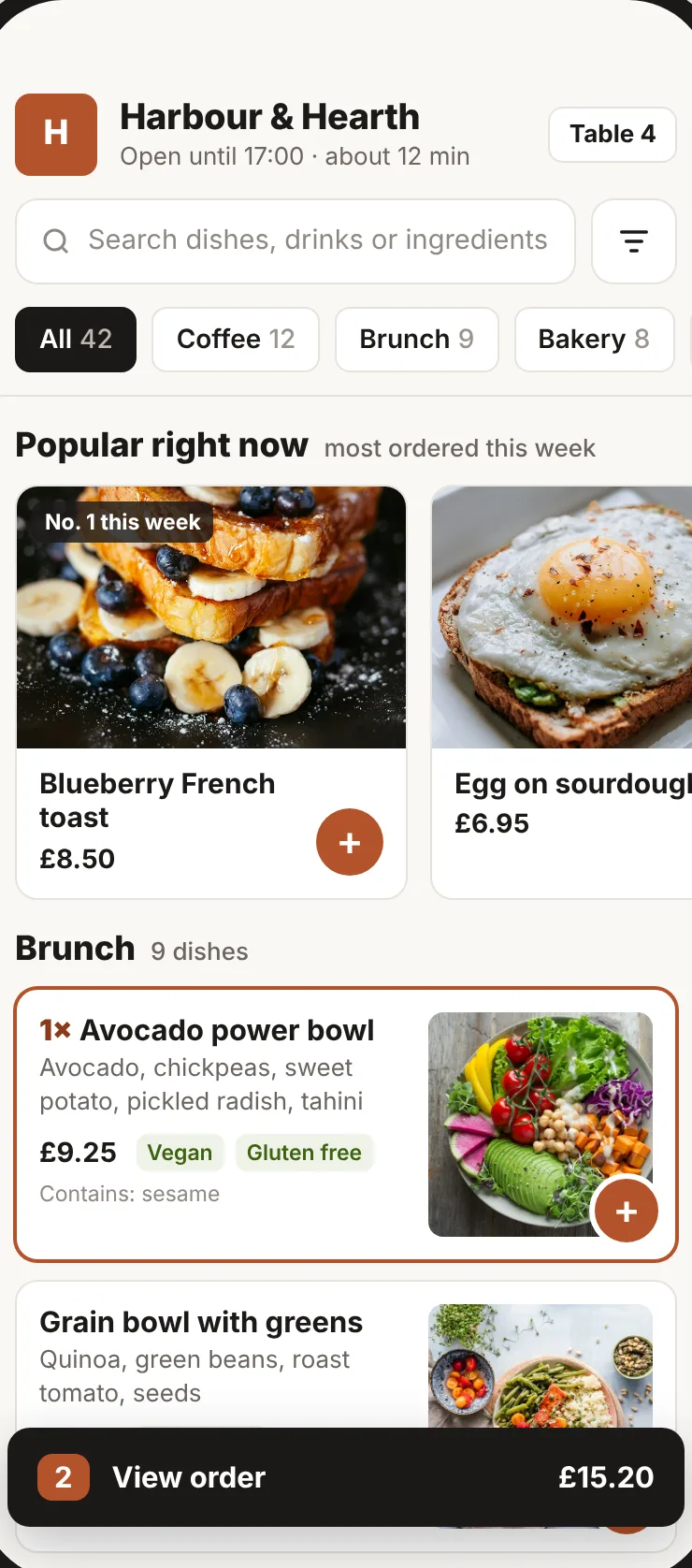
Guests order from their own phone, in the browser, with nothing to install.
A QR code for every table →
Each code carries its table, so every order arrives saying where it goes.
No app to download
The menu opens in the phone's browser on iPhone and Android.
Your branding
Your venue name, logo and accent colour on the menu, checkout and receipt.
Name, order code and notes
Guests add their name and an optional note for the kitchen, and get a short order code to quote at the counter.
Self-ordering kiosk →
A counter tablet with photo tiles: guests order, get a number and pay at the counter, and the screen starts over for the next one. Part of the POS plan, or a £5 a month add-on.
Call staff or request the bill →
Two buttons on the menu send a request to your dashboard with the table number.
Menu on your own website
Embed your live menu on your website, so prices and sold-out items stay current there too.
Regulars and reviews
Turn a single order into a guest who comes back, with their permission.
Stamp card and points →
Guests join from the menu and collect a stamp on every order over your minimum spend towards a free item, money off or a percentage off, or points to spend on up to four rewards at the till.
A customer list you control
The contacts belong to your venue, with consent recorded for each channel and an unsubscribe route. Add notes, tags and a birthday, and the till shows them.
Offers that send themselves →
Birthday, win-back and reward-ready messages go out by themselves to opted-in members, and you can message regulars about a quiet afternoon or a new dish.
Feedback and Google reviews
Guests rate their visit after ordering. Every guest gets a link to review you on Google, and anyone unhappy can also tell you privately what went wrong.
Reports and integrations
See what sold and move the numbers where you need them.
Sales reports →
Revenue, order count, average order, best sellers and sales by category and by channel, for any date range, against the previous period.
Busiest times
See which half hours are busiest, so you know when to put extra hands on.
Printable menu →
Print your menu from the dashboard for the window, the counter or the tables.
Takings export
Download daily totals, online and at the till, with tips, service charge and VAT, or one row per order, as CSV.
Square till sync
Paid Café QR orders are pushed into Square, and items sold out in Square are hidden on your menu.
More venues, stock and insight (Multi-site plan)
For groups and busier venues. Part of the Multi-site plan, £59 a month for the first venue and £29 for each extra venue. Single venues can add stock, insights and food safety together as the £19 Profit & Compliance add-on.
More than one location
One menu and one account for several venues, each with its own tables, opening hours, kitchen screen and takings. Hide dishes or change prices per venue, and hold staff to their own site.
Central kitchen transfers →
Send stock from a central kitchen to a branch. The branch receives what arrived, shortfalls are noted, and each transfer prints as a numbered delivery note. Each branch has its own pars.
Stock and recipes →
Say what each dish and option uses, and every order takes it off stock at that venue. See each dish's cost and margin, make prep batches, count stock with variance, and turn low stock into suggested orders.
Insights →
Busy times by day and hour, which dishes earn their place on the menu, how guests order, and how many come back.
Profit per dish on every channel →
What each dish earns at the table, at the till and on each delivery app, after VAT, food cost from its recipe and the app's commission.
A Monday email →
Last week in a few lines: sales against the week before, estimated profit, app fees, best and thinnest-margin dishes, missed safety checks and late clock-ins.
Ask your business
Ask a plain question, such as which day was quietest last month, and get an answer from your own sales figures.
QuickBooks, Sage and Xero →
Each day's takings sent to QuickBooks or Sage overnight as one balanced journal, to the accounts you choose, or downloaded as CSV for Xero.
Activity log
A record of who changed what: refunds, staff, settings and more.
Food safety & compliance (SFBB)
Digital HACCP compliance, opening and closing checklists, temperature monitoring with forced corrective actions, and inspection reports.
Digital checklists →
Opening, closing and deep cleaning checklists with staff completion timestamps, optional notes and overdue alerts on the Today screen.
Temperature logs with corrective actions →
Record fridge, freezer, hot-hold and delivery intake checks against the UK safe limits. Out-of-range readings require a recorded corrective action.
Daily SFBB diary →
Daily due diligence sign-off based on the UK Food Standards Agency's Safer Food, Better Business format with shift notes and manager sign-off.
EHO inspection mode →
A clean, read-only inspector dashboard covering up to 12 months of checks, temperature logs, corrective actions and the 14-allergen matrix.
The back office
Where the owner and managers run the day, on a laptop or a phone. The areas you see follow your plan.
Today
Opens on what needs you now (guests asking for staff, late orders, low stock), live orders by stage and takings against the same day last week.
Close the day
After closing, Today becomes a short checklist: count the cash drawer, settle open tabs and check tomorrow's bookings.
Nine areas with tabs
Today, Orders, Tables, Delivery, Menu, Stock, Safety, Customers and Reports. Switch off what your café doesn't do and it disappears for everyone.
Open a screen
One launcher for the till, kitchen screen, waiter app, order-ready board, TV menu board, customer display, kiosk and time clock. A till, kitchen or waiter device can remember its screen and open on it at every sign-in, and kitchen staff land on the kitchen screen.
Settings in one place
Your café, ways to order, money, team and plan on one page, with what's left to set up.
Jump to anything
Press Ctrl K (or ⌘K) and type to go to any page or setting by name.
On your phone
A bottom bar with Today, Orders, Tables and Reports, and everything else under More.
Setup and account
Start on your own, or have us set it up with you.
First month free →
Set up the menu, tables and staff screen and test a real order before you pay. No card needed and no setup fee.
Your own menu address →
Your menu gets its own web address to share, separate from the table codes.
Your data kept separate
Each venue's menu, orders and customers are isolated from every other venue on Café QR.
TV menu boards
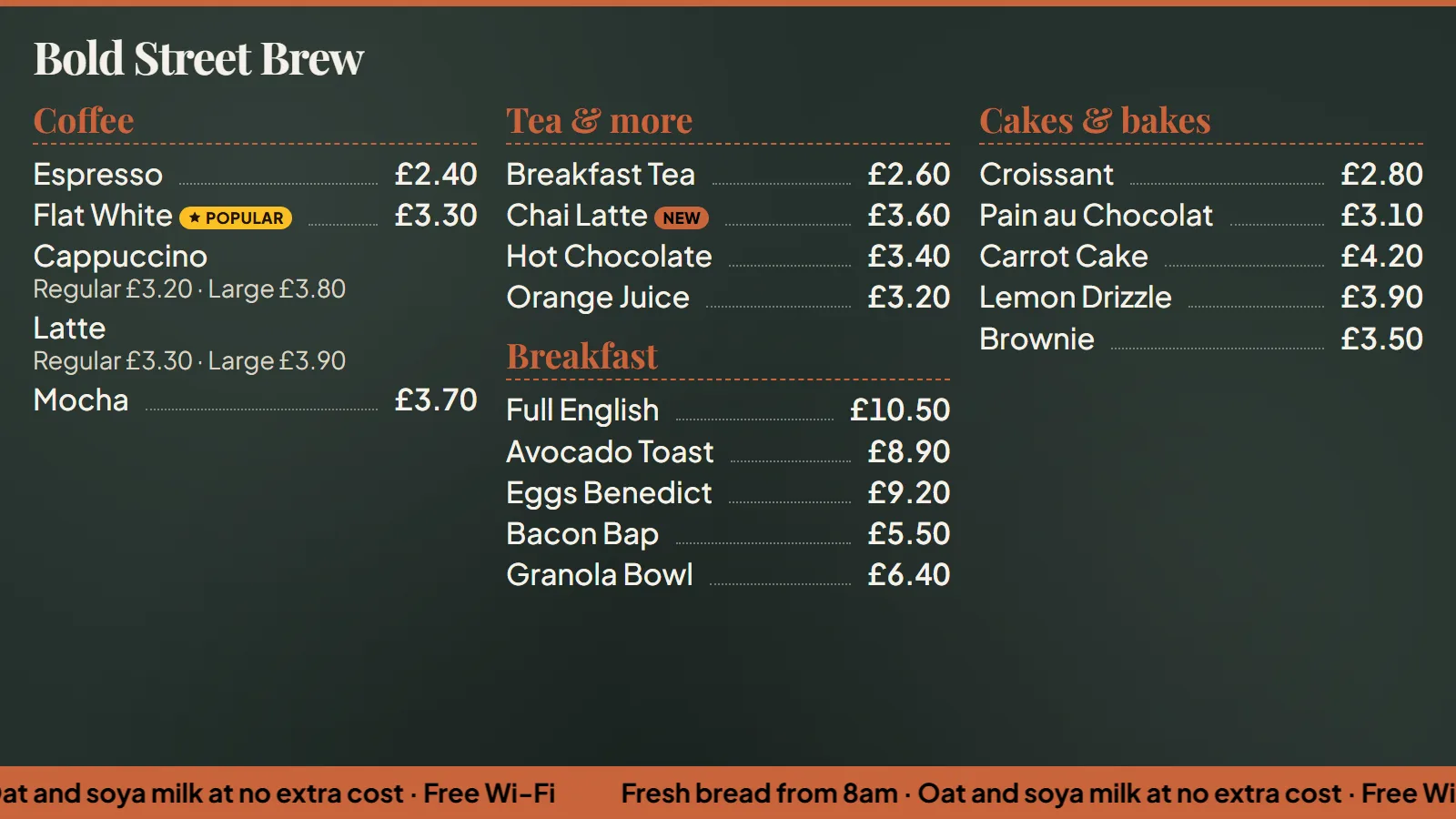
Your live menu on the TV in the shop.
- Prices, sizes and sold-out dishes change on the TV by themselves, within a minute
- Four looks in your colour, from a café chalkboard to neon, designed from your phone
- Food on one TV and drinks on another, landscape or portrait
- New and Popular badges, promo slides and a scrolling strip for your specials
- Seasonal decorations that come on and go off by date
In the POS plan at £39 per venue a month, or the Self-order kiosk add-on at £5 a month.
In more detail
POS features, one page each.
How each part of the POS works during service, which plan includes it, and what it does not do yet.
- EPOS till system and waiter appThe counter till and the waiter app: ring up sales, take cash or card, split bills, give discounts with a manager PIN, and send table orders to the kitchen as a tab.
- Kitchen display systemThe kitchen screen (KDS): every till, waiter, QR, kiosk and online order on one live board, with kitchen stations, late-order timers, recall and kitchen printers.
- Self-order kioskThe self-order kiosk: a counter tablet where guests touch to start, choose eat in or take away, order and get a number, with the order sent to the kitchen screen.
- TV menu boardsTV menu boards: the live menu on any smart TV in the shop, in big type and your colours, with prices and sold-out dishes that change on the TV by themselves.
- Floor plan and tabsThe floor plan and open tabs: a live map of your tables, orders kept on each table's tab, moving tabs between tables, and splitting the bill at the end.
- Stock and recipesStock and recipes: ingredients off stock with every order, dish margins, prep batches, counts with variance, branch pars, suggested orders and central kitchen transfers.
- Cash-up and reportsCash-up, the staff rota and time clock with a tip pool, sales and takings reports for any date range, Insights, the QuickBooks or Sage sync, and Xero by CSV.
- Profit per dishProfit per dish on every channel after VAT, food cost and delivery app commission, and a Monday email with last week's sales, profit, missed safety checks and late clock-ins.
- Delivery app ordersDelivery app orders on the same kitchen screen, printers and takings as your own orders, through Deliverect, Otter or the order API, with direct Uber Eats and Deliveroo connections coming soon.
- Table bookingsTable bookings: your own booking page that only offers times you have seats for, a diary for phone bookings and no-shows, a waitlist for walk-ins and deposits.
- Customer loyalty and stamp cardsCustomer loyalty: set up in four steps with a live preview, a stamp card of 6 to 12 stamps, points towards up to four rewards, a members list with CSV export, birthday and win-back offers that send themselves, a prize-draw sign-up page, home-screen notifications, booking reminders and the member's card on the guest menu.
- Gift cardsSell gift cards from the dashboard, print each one with its own code, and take them as payment at the till, on the QR menu, at the kiosk or online. The money stays out of your sales figures until the card is spent.
- Staff rota and time clockA weekly rota with planned cost, clocking in and out with breaks on the till, hours and pay for every person, labour cost against sales, tips shared by hours and a timesheet export for payroll.
- Accounting integrationsEach finished day goes to QuickBooks Online or Sage overnight as one balanced journal, split by how it was paid, sales, VAT, service charge and tips, with a CSV of the same journals for Xero and any other package.
- Own delivery and website orderingCollection and delivery orders on your own order page and website, delivery zones by postcode with a fee and minimum order for each, and your own riders working from a link on their phone. No commission.
- Food safety & HACCP complianceFood hygiene compliance built for UK cafés: daily SFBB diary sign-offs, opening and closing checklists, temperature logging with forced corrective actions, and read-only inspection reports.
- Digital checklists for shift routinesScheduled opening, closing and cleaning checklists on tablets or phones: staff tick off checks, add notes or photos, and overdue checks alert managers on Today.
- HACCP compliance & SFBB daily diaryDaily due diligence in the style of the FSA's Safer Food, Better Business: fridge and freezer temperature logs, forced corrective actions, and daily diary sign-offs.
- Inspection mode & allergen matrixA dedicated read-only screen for Environmental Health Officers: up to 12 months of SFBB diaries, temperature logs, corrective actions and the 14-allergen matrix, with print export.
- Ask Claude about your caféThe Café QR connector for Claude: ask about sales, orders, best sellers, the menu, busy times and guest feedback in plain words, using your own figures. Free on every plan.
Missing something?
Tell us what your venue needs.
Café QR is built with the cafés, bars and pubs that use it. If a feature you depend on is not listed, tell us what it is and how you would use it during service.
Prefer to talk it through?
Book a walkthrough or ask us anything.
Tell us about your venue and we’ll reply, usually within one working day, to plan your setup or show you round the till on a call. It’s an enquiry only: no card, no subscription and no trial started.