
Café QR

Scan, order and pay at the table

A QR table ordering app and system for restaurants, cafés and pubs

Café QR is table ordering software for UK restaurants, cafés and pubs. Guests scan a QR code on their table, browse your menu, order food and drinks, and pay on their own phone, so it works as a table ordering app with no app to download. Each order reaches your kitchen screen with the table number and chosen options, so your team can prepare it and bring it to the right table. Start with table ordering, then add the Café QR till when you need it.

One month free, no card needed. No contract.

A guest smiles at her phone at a café tableQR table ordering
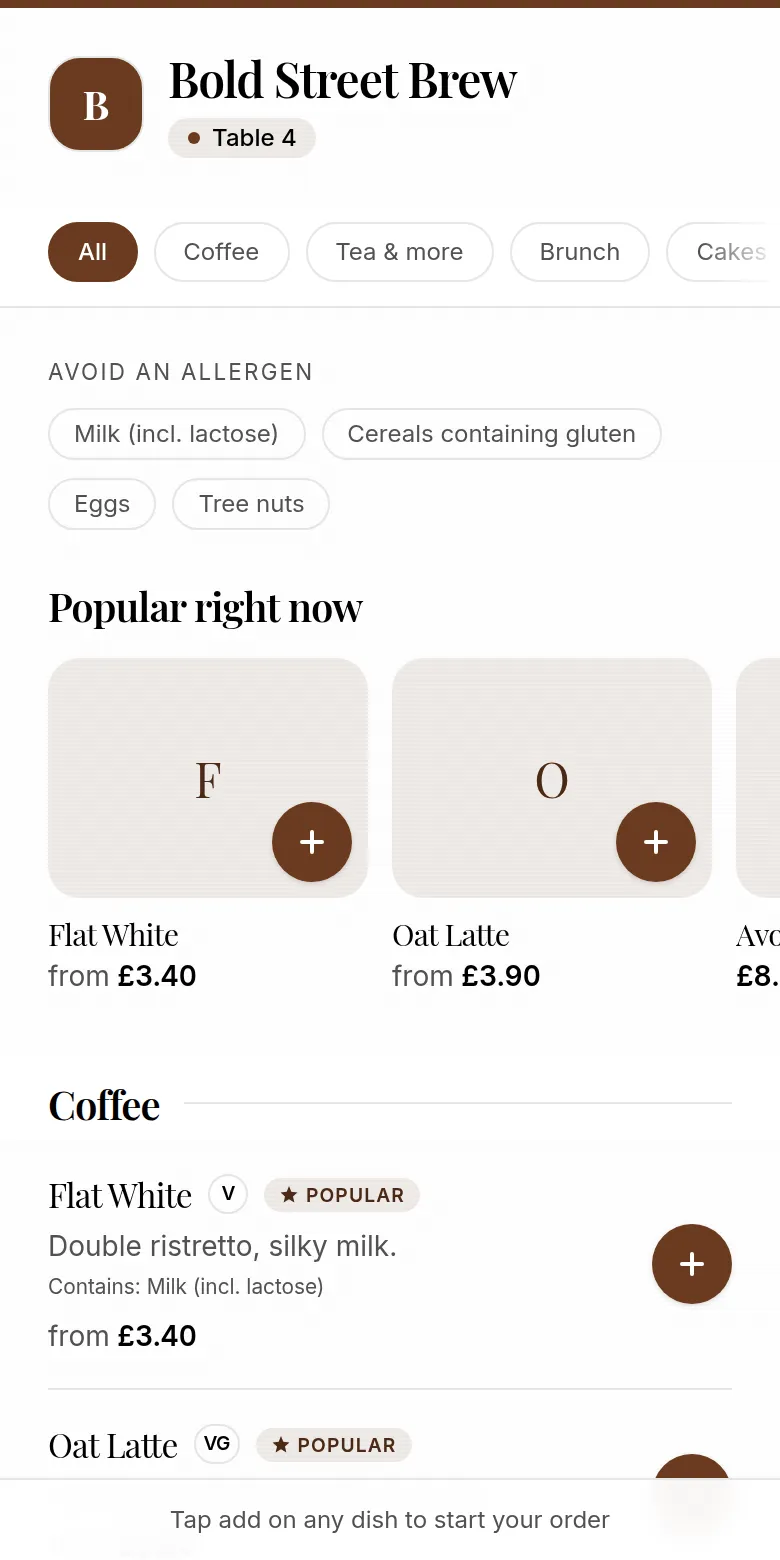
Guest menu on a phone with popular items and dietary tags
  • Guest setup

    No app to download

  • Orders arrive

    On your kitchen screen, with the table number

  • Price

    From £9.99 a month, first month free

16 seconds at table 7

Scan, order, pay. Straight to the kitchen.

From table to kitchen to takings. A guest scans the QR code on table 7, orders Flat white, Almond croissant, Oat latte, and pays £10.40 on their phone. The order appears on the kitchen screen as New, moves to Preparing and then Ready, the guest's phone shows the order is ready, and the sale is added to the day's takings.

See the actual ordering screens

From the table QR code to your kitchen screen.

Watch a guest open the menu, choose their order and send it to the kitchen using pay at the till. The 30-second walkthrough also shows menu importing and printing a code for each table. Connect Stripe when you want to offer online payment too.

Want to try it yourself? Open the live demo at Bold Street Brew, our fictional café. Demo orders are not prepared or charged.

Try the table ordering demo →
30 seconds: guest ordering, the kitchen screen and table QR setup. English captions and transcript included.
Read the transcript

Café QR: a QR code that does more than show a menu. Guests scan the table QR to open a branded menu with no app download. They tap to order, with options and a running total in the cart, and place the order to pay at the till. The order appears on the kitchen screen straight away: New, Preparing, Ready, one tap each. Snap a photo of a printed menu and the items are imported for you, ready to check. Print a QR code for every table and go live in minutes. Guests can opt in to your customer list, so you can send WhatsApp and email offers. Orders, menu, customers and QR codes are all in one place.

Part of a full POS

The till, the floor and the kitchen in one system.

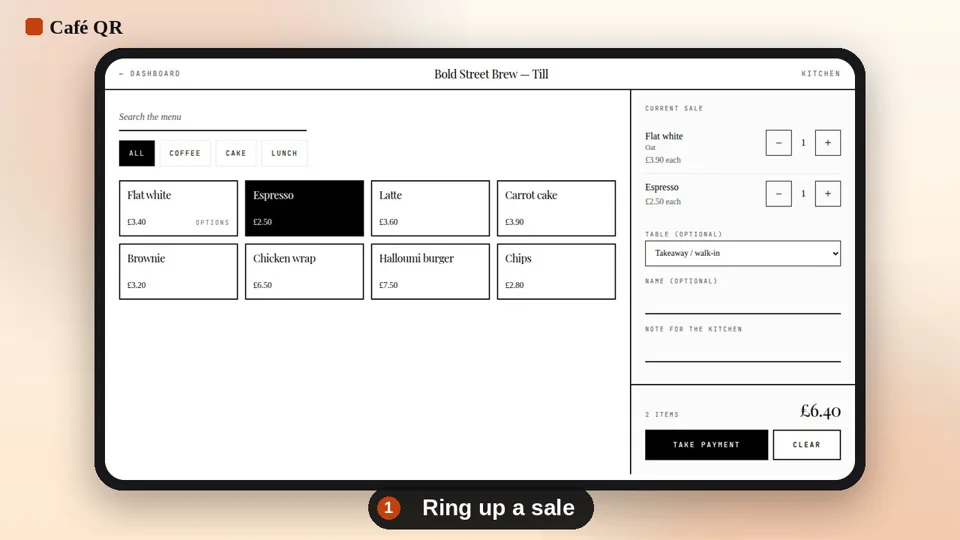
  • Counter till on any tablet, phone or laptop: cash with the change worked out, or card
  • Waiter app, tabs, split bills and a live floor plan
  • Kitchen screens by station and printed tickets
  • Refunds, time clock and cash-up against your float
  • Table QR and your own online page feed the same kitchen and takings
The Café QR till with a flat white and an espresso in the current sale
01

How QR code food ordering works at the table

Give each table its own QR code. Guests scan it with their phone camera, choose dishes and drinks from your live menu, and review their basket. The table number travels with the order, so guests do not have to type it in and staff do not have to ask where they are sitting.

With Stripe connected, guests pay by card, Apple Pay or Google Pay before the order reaches the kitchen. You can also start with pay-at-the-till ordering. Staff see the items and options on a phone, tablet or laptop and move the order from new to preparing to ready.

  • Scan the table code and open the menu
  • Choose food, drinks, sizes and extras
  • Pay online or choose pay at the till
  • Staff receive the order with its table number
02

Scan the table, open the menu

Each table gets its own QR code. Scanning it opens your venue's menu in the guest's phone browser, with no account to create before browsing and no app-store step between sitting down and ordering.

Guests can order when they are ready instead of joining the counter queue. A code by the till or on the queue's A-board lets people waiting in line order before they reach the counter.

03

Your food and drink menu, with every option

Items can carry required and optional choices with their own prices: a side with a main, cup size, oat or skimmed milk, an extra shot or syrups. The price updates as the guest chooses, so the order records exactly what they asked for.

Change a price, add a special or mark an item sold out from the dashboard. Every printed code already points at the updated menu, so there is nothing to reprint. You can also import a printed menu from a photo, or from your Square catalogue.

  • Categories, descriptions, photos and allergen information
  • Sold-out items hidden from guests straight away
  • Your venue name, logo and accent colour on the menu
04

Orders land on the kitchen screen

Each order shows its table, the guest's name, a short order code, every chosen option and any kitchen note. Staff move it from new to preparing to ready with one tap, without paper tickets or reading a guest's phone screen.

If you prefer paper in the kitchen, connect a supported Star or Epson network printer and a ticket prints as each order arrives. Cafés using Square can have orders pushed into Square too.

  • Live order board for counter and kitchen staff
  • Optional kitchen tickets on Star CloudPRNT or Epson printers
  • Ordering hours and a pause switch for busy or closed periods
06

Table ordering apps compared: Café QR, SumUp, resmio and Slerp

Café QR's table ordering starts at £9.99 per venue a month with a 0% Café QR platform fee. Guests pay through your own Stripe account, so Stripe's standard processing charges are the only per-order cost.

SumUp Order & Pay comes with SumUp POS Plus, which SumUp's Order & Pay page lists at £39 a month with a 2.50% transaction fee.

resmio's price page lists QR code ordering on all its plans, including the free Basic plan, with a 2% commission on QR code orders. Its paid plans are €69.90 and €129.90 a month plus VAT, with a 12-month minimum term.

Slerp does not publish its prices on its website, so you need to ask Slerp for a quote.

Prices were checked on each company's own website on 30 October 2026 and can change, so check them before you choose.

07

Start with table ordering, add the full POS later

QR ordering is included in every plan, starting with Order & Pay at £9.99 per venue per month. You can use the kitchen order screen without buying the Café QR till. The first month is free, with no card needed and no setup fee. Stripe processing charges apply separately to online payments.

If you need a counter till, waiter app, tabs, floor plan and bookings, the POS plan is £39 per venue per month. QR orders and till sales then share one menu, one kitchen queue and the same takings and cash-up. Staff can still take orders for guests who prefer to speak to someone.

Questions

Straight answers, before you start.

What is table ordering software?

Table ordering software lets guests order, and usually pay, from their own phone at the table by scanning a QR code. Orders go straight to the kitchen screen or printer with the table number, so staff do not need to take the order by hand.

Do customers need to download an app?

No. Scanning the table QR code opens your menu in the phone's browser, on iPhone and Android. There is nothing to install and no account to create before ordering.

Does each table get its own QR code?

Yes. Each table has its own code, so every order arrives on the staff screen with the table number already on it. To share your menu online, use your menu link rather than a table code.

Can I change the menu during service?

Yes. Change a price, add a special or mark an item sold out from the dashboard and guests see it the next time they open or refresh the menu. Printed codes never need reprinting.

How do customers pay?

With Apple Pay, Google Pay or card through your own Stripe account, before the order is sent to staff. Until you connect Stripe, guests order from the table and pay at the till.

Do I need to buy any hardware?

No. The staff order screen runs in a browser on any phone, tablet or laptop. If you want paper tickets, you can connect a supported Star CloudPRNT or Epson network printer.

Does it work with the till?

Yes. QR ordering is part of the Café QR POS, so table orders and till sales share one menu, one kitchen screen and one set of takings. The till itself is on the POS plan.

How much does it cost?

From £9.99 per venue per month on Order & Pay, with the first month free and no card needed. 0% Café QR platform fee and three staff logins included. Stripe's processing charges are separate.

One-month free trial

Run your venue on Café QR.

From £9.99 per venue, per month after the free month, which needs no card. No setup fee, and 0% platform fee. Rather someone showed you round? Book a free 15-minute walkthrough here. It’s an enquiry only: no card, no subscription and no trial started.

An enquiry only. No card or subscription required

We use these details to respond to your enquiry. Read our privacy notice.

This website uses cookies. Details