
Café QR

Part of the Café QR POS · Loyalty

A café loyalty programme built around real orders

A café loyalty programme works when regulars never have to think about it. Guests join from your QR menu or at the till with their phone number, with no app to download. Every paid order linked to that number earns a stamp or points, and a full card can be used at the till, on your QR menu or online.

One month free, no card needed. No contract.

A guest smiles at her phone at a café tableCRM and loyalty
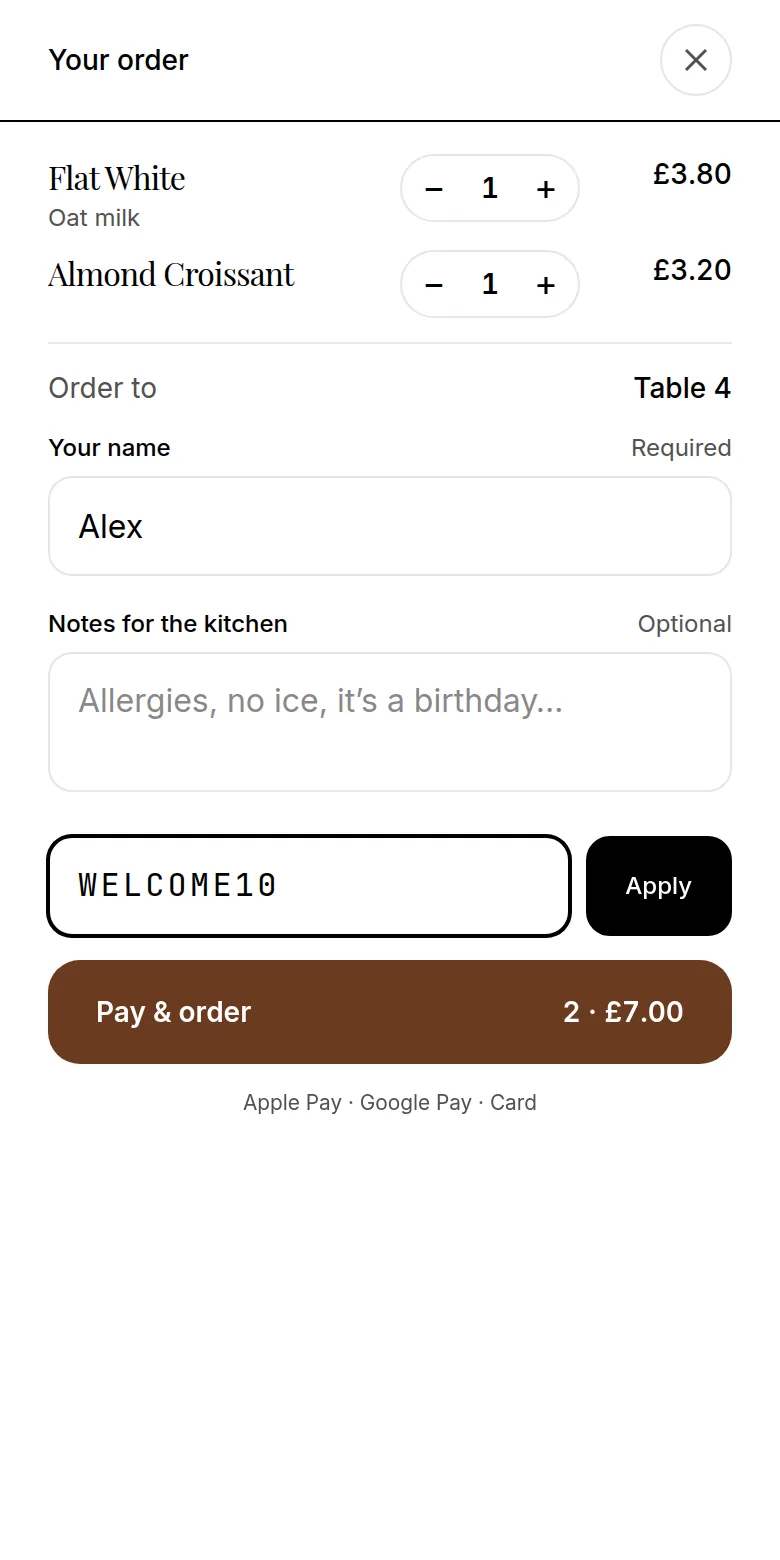
A promo code applied at checkout on the guest menu
  • Joining

    From the menu or the till, no app

  • Rewards

    A stamp card, points or both

  • Messages

    Only to guests who opted in

Part of a full POS

The till, the floor and the kitchen in one system.

  • Counter till on any tablet, phone or laptop: cash with the change worked out, or card
  • Waiter app, tabs, split bills and a live floor plan
  • Kitchen screens by station and printed tickets
  • Refunds, time clock and cash-up against your float
  • Table QR and your own online page feed the same kitchen and takings
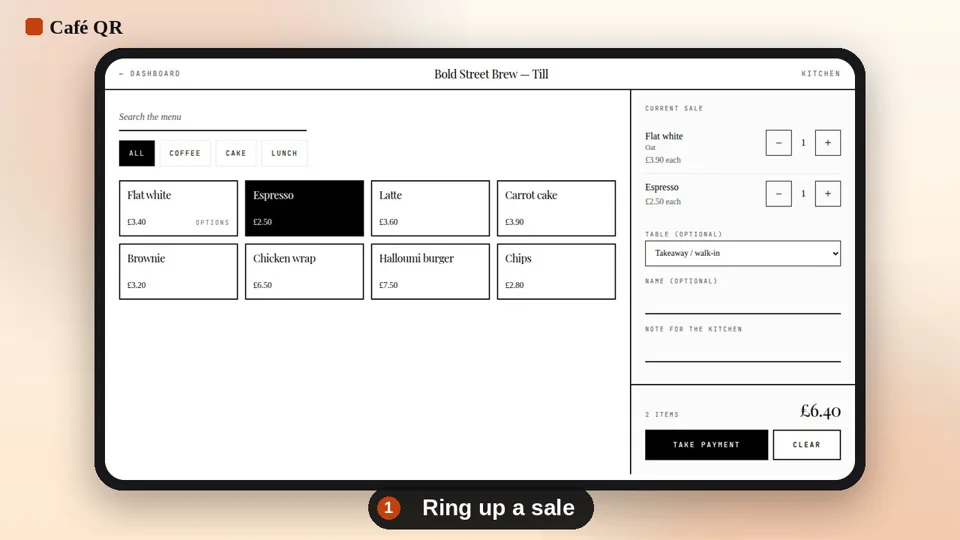
The Café QR till with a flat white and an espresso in the current sale
01

A loyalty card app without the app

Most guests will not download a loyalty card app for one café. In Café QR, the card lives on your own menu: when a member opens your QR menu on their phone, their stamp card shows at the top, in your café's colours, with the reward to come. Anyone who has not joined sees the deal and a link to join.

Joining asks for a name, a phone number or email, and a birthday if they want birthday treats. It is separate from paying, and ordering never depends on it.

  • No app to download and no card to carry
  • The member's card on your QR menu
  • Join from the menu or at the till
02

A stamp card, points, or both

Set it up in four steps on the Customers page, with a live preview of the guest's card beside you: how it works, how many stamps or points, what members get, and how they join. Choose a stamp card of 6, 8, 10 or 12 stamps with an optional minimum spend, points towards up to four rewards, or both. There are no tiers to manage.

A stamp or points are added by themselves when an order linked to the member's phone number is paid, at the till, from the table or online, so nobody stamps cards at the counter. A full card gets a free item, money off or a percentage off, and members can use it at the till, on your QR menu or online. Points are spent on rewards at the till.

  • Stamps and points added when the order is paid
  • Full cards used at the till, on the QR menu or online
  • Welcome stamps for new members
  • Notes, tags and birthdays on each member
03

Loyalty starts with permission

Joining your loyalty programme does not mean agreeing to marketing. Guests choose separately whether to hear from you by WhatsApp, text or email, and each choice is recorded with when and where they made it. Guests who say no still collect their stamps.

Every message has an unsubscribe link, and you can see your members list and manage offers from the owner dashboard.

04

A practical list, not a marketplace audience

The contact belongs to the relationship between the guest and the café. Café QR provides the software used to collect the choice and manage the list; it is not a consumer marketplace competing for the same customer. You can download your members list as a CSV file at any time.

That gives an independent café a straightforward way to contact regulars about a genuine offer, a new menu item or a quieter service period.

05

Offers that send themselves

Birthday, win-back and reward-ready messages can send themselves to members who agreed to that channel, and a win-back can be timed to each guest's usual visits. Before sending a one-off offer, make sure it matches what the guest agreed to receive.

Loyalty is included in every plan. The ordering and payment features work the same whether or not the café sends marketing messages.

  • Separate opt-in for each channel
  • Unsubscribe controls for guests
  • Customer and offer management for the café owner

Questions

Straight answers, before you start.

Do guests need an app or a punch card?

No. Guests join from your QR menu in their phone's browser or at the till with their phone number. Their stamp card shows on your menu whenever they open it on that phone. There is no app to install and no card to carry.

How do stamps and points get added?

By themselves. When an order linked to the member's phone number is paid, at the till, from the table or online, the stamp or points are added. Staff link members at the till and guests type their number when they order.

Where can members use a full card?

At the till, on your QR menu or on your online order page. Points are spent on rewards at the till.

Does placing an order sign a guest up for marketing?

No. Joining is a separate choice, marketing is a further choice for each channel, and messages only go to guests who opted in. Every message has an unsubscribe link.

Does the loyalty programme cost extra?

No. Loyalty is included in every plan, from Order & Pay at £9.99 a month.

One-month free trial

Run your venue on Café QR.

From £9.99 per venue, per month after the free month, which needs no card. No setup fee, and 0% platform fee. Rather someone showed you round? Book a free 15-minute walkthrough here. It’s an enquiry only: no card, no subscription and no trial started.

An enquiry only. No card or subscription required

We use these details to respond to your enquiry. Read our privacy notice.

Cookies on Café QR

We would like to use one optional cookie, Microsoft Clarity, to see how people use this site (page heatmaps and session recordings) so we can improve it. It only runs if you accept. You can change your mind at any time from “Cookie settings” at the foot of every page. Privacy notice